| Booting! What is this? |
| What is Booting? |
| Booting (booting up) is a bootstrapping process that starts operating systems when the user turns on a computer system. A boot sequence is the set of operations the computer performs when it is switched on that loads an operating system. |
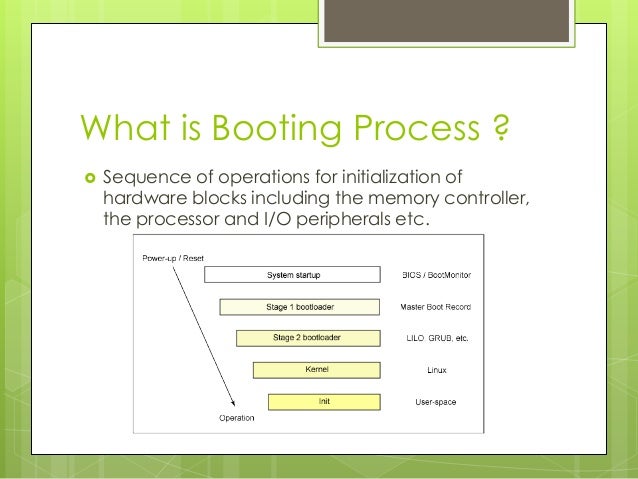 |
| When you turn on the power to a computer, the first program that runs is usually a set of instructions kept in the computer's read-only memory (ROM). This code examines the system hardware to make sure everything is functioning properly. This power-on self test (POST) checks the CPU, memory, and basic input-output systems (BIOS) for errors and stores the result in a special memory location. Once the POST has successfully completed, the software loaded in ROM (sometimes called the BIOS or firmware) will begin to activate the computer's disk drives. In most modern computers, when the computer activates the hard disk drive, it finds the first piece of the operating system: the bootstrap loader. |
| The bootstrap loader is a small program that has a single function: It loads the operating system into memory and allows it to begin operation. In the most basic form, the bootstrap loader sets up the small driver programs that interface with and control the various hardware subsystems of the computer. It sets up the divisions of memory that hold the operating system, user information and applications. It establishes the data structures that will hold the myriad signals, flags and semaphores that are used to communicate within and between the subsystems and applications of the computer. Then it turns control of the computer over to the operating system. |
Amazon currently hiring Marathi Voice Support Executive Job in Thane Maharashtra for 12th pass freshers who had fluency in Marathi or Hindi or English language can apply online with ease. Post: Voice Support Executive – Freshers Department: Customer Support Work location: Thane Maharashtra (candidate may get nearby branch of Mumbai ) Education: 12th pass and above Language Preference : Marathi / HI_IN / EN_IN Salary: 12,000 to 17,000/- per months Candidate who cleared 12th exam and looking for tele-calling job in Thane or back office jobs in Thane area for freshers, can apply jobs at amazon over here. Basic need to enrol for Amazon jobs in Thane: • Firstly, good in talk which is communication skills should be excellent in any of Marathi, or English. • Must be able to handle telephonic software support, should have computer knowledge. • Candidate should be able to handle the voice calls from local customers of Maharashtra state in Marathi or English Language. • Problem-solving ...
Comments
Post a Comment